Single sign-on between two apps without an identity provider: the one-minute ticket
Two internal tools on different domains, no shared cookie, and no appetite for an identity provider for a handful of users. A signed ticket that lives sixty seconds and works once replaced the second login. The flow, the code, and the four responses we measured in production.
Also in: Español
We have two internal tools that the same people use one after the other. One is a panel that runs on Vercel. The other is the editor where we write proposals, and it runs on our own server. The panel has an "Open in editor" button, and until September 29, 2026 that button took you to a second login form: you were already signed in to the panel, and the editor asked for your email and password again.
They cannot share a cookie because they live on different domains. The usual answer is an identity provider (Auth0, Keycloak, Google Workspace via OIDC) that both apps trust. For two apps and a short list of users, that is a new service to run, a new account to pay for and a new place for login to break. We did it with a ticket instead.
The flow
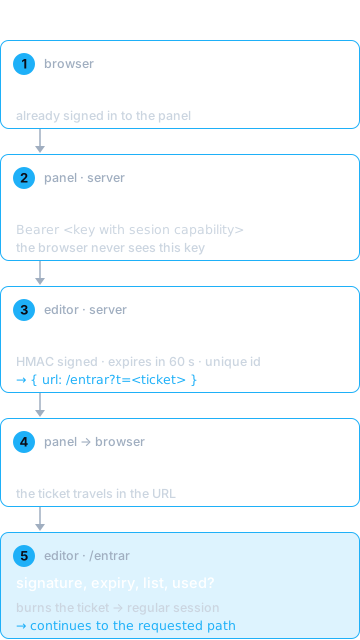
- The person, already signed in to the panel, clicks "Open in editor".
- The panel's server, after checking that this person is an owner, calls
POST /api/integracion/sesionon the editor with{ email, a }, whereais the editor path to open. It authenticates with an API key the browser never sees. - The editor checks that the email is on its own user list, signs a
ticket, and answers
{ url: "https://<editor>/entrar?t=<ticket>" }. - The panel redirects the browser to that URL.
- The editor's
/entrarpage redeems the ticket for its regular session (the same next-auth session a password login produces) and continues toa.
No secret is shared between the two apps. The signing key never leaves the editor: it signs the ticket in step 3 and verifies it in step 5. The panel only holds an API key that can ask for tickets.
The ticket
It is a JSON body in base64url plus an HMAC-SHA256 of that body:
export const VIDA_MS = 60_000;
const CONTEXTO = 'propuestas:entrada-del-hub:v1';

const firma = (cuerpo, secreto) =>
  createHmac('sha256', secreto).update(`${CONTEXTO}.${cuerpo}`).digest('base64url');

export function emitirTicket({ email, a }, { secreto = process.env.NEXTAUTH_SECRET, ahora = Date.now() } = {}) {
  if (!secreto) throw new Error('falta NEXTAUTH_SECRET');
  const cuerpo = b64(JSON.stringify({
    e: email.trim().toLowerCase(),
    a: destinoSeguro(a),
    x: ahora + VIDA_MS,                     // expires in 60 s
    j: randomBytes(12).toString('base64url'), // unique id, for single use
  }));
  return `${cuerpo}.${firma(cuerpo, secreto)}`;
}
The identifiers are in Spanish because the code is: e is the email, a the
destination, x the expiry and j the ticket id. Two details are easy to
skip:
- The context string (
propuestas:entrada-del-hub:v1) goes into the HMAC. The editor reuses its session secret, so the context keeps this signature from being valid anywhere else that secret signs something. - No secret, no ticket. A ticket signed with
undefinedcould be forged by anyone, so the function throws instead of issuing one.
Redeeming checks, in this order: the signature (with timingSafeEqual), the
shape, the expiry, that the email is still on the list, and that the id was
never used. Only then does it record the id as used and return the session.
The reason for a failure goes to the server log; the screen says the same thing
in every case: the link expired, go back and click again, or sign in with
your password.
Four decisions that carry the security
1. The ticket is requested server to server, with its own key. The key
the panel uses has one capability, sesion, in its own entry. It is not
inherited from the panel's other keys (the one that reads the proposal
portfolio, the one for the client portal). A key that can mint tickets for a
listed user is worth exactly as much as that user's login, so it should not
come bundled with anything else.
2. The editor still decides who gets in. The panel saying "this is an owner" is not enough: the email has to be on the editor's own user list, and it is checked twice, when the ticket is requested and again when it is redeemed, in case the list changed in between. The ticket does not create users. When we shipped it, one of the panel's owner accounts was not on the editor's list, and the editor kept asking that account for a password. That is the design working, and the fix is adding the account to the list, not trusting the panel more.
3. Sixty seconds and one use, because it travels in a URL. A URL ends up in browser history and in access logs. An expired or already redeemed ticket is worth nothing there. The ticket is used by a redirect that happens right after it is issued, so a minute leaves margin for a slow network and little time for anyone else.
4. The destination can only be a path of the editor. a must start with
/, cannot start with // or /\, and cannot contain line breaks. Anything
else becomes /. Without that, the ticket endpoint would be an open redirect
that can carry a signed-in session.
How we checked it
On September 29, 2026 we ran these against production with curl:
| request | response |
|---|---|
| first redeem of a ticket | session returned, and /documentos answers 200 |
| second redeem of the same ticket | 401 |
| asking for a ticket without the key | 401 |
| asking for a ticket for an email not on the list | 403 |
| asking for a ticket with an external destination | the destination is rewritten to an editor path |
The second line is the one that matters most: it shows the ticket really burns. A login that works proves very little about the parts that are supposed to fail.
Before copying it
- The "used" record lives in memory. The editor runs as a single
container, so a
Mapis enough. If it restarts, the worst case is that a ticket less than a minute old can be redeemed one more time. With more than one replica, that record has to move to shared storage (a table, Redis), or each replica will accept the same ticket once. - Rotating the session secret also invalidates tickets in flight. With a 60-second lifetime, that is harmless.
- The
/entrarpage reads the destination from the ticket without verifying it, only to know where to go after redeeming. The verification happens on the server, and if it fails there is no session, so the destination does not open. If you copy the pattern, keep that order. - When not to use it. This works because it is a few internal users, two apps, and one of them can be the one that signs. With external users, more apps, or a requirement to sign out everywhere at once, use a real identity provider.
It replaced a second login with one small module, one route, one page and an extra API key. If you have two tools asking your team for the same password twice, write to us and tell us about your setup.