Give your site an endpoint that says which commit it came from
Thirty lines in a Next.js route, and "which version is live?" is answered with a curl and a git rev-parse. How we built it for vendear, where the commit comes from, and why the answer also says how the deploy was made.
Also in: Español
You fix something, merge it, and someone asks whether it is in production yet.
If the site deploys on every push to main, nobody ran the deploy while
watching the screen, so the answer usually comes from comparing the time of
the last deploy with the time of the last commit. That is an approximation:
two close timestamps do not prove the build came from that commit.
On vendear, our storefront site with an AI salesperson, the question is now answered like this:
curl -s https://www.vendear.com/api/version
{"commit":"ef66746e2df30970b7968c6e68d0d7066ec92153","branch":"main","source":"vercel-git","env":"production","builtAt":null}
And compared against the repo:
git rev-parse origin/main
# ef66746e2df30970b7968c6e68d0d7066ec92153
They match: what is live is main. That reading is from October 5, 2026, and
there is nothing left to interpret.
The whole route
It is a Next.js (App Router) route handler at src/app/api/version/route.js:
export const dynamic = "force-dynamic";

export function GET() {
  const fromGit = process.env.VERCEL_GIT_COMMIT_SHA || null;
  const fromCli = process.env.COMMIT_SHA || null;

  return Response.json(
    {
      commit: fromGit || fromCli,
      branch: process.env.VERCEL_GIT_COMMIT_REF || process.env.COMMIT_BRANCH || null,
      source: fromGit ? "vercel-git" : fromCli ? "local-cli" : null,
      env: process.env.VERCEL_ENV || null,
      builtAt: process.env.BUILT_AT || null,
    },
    { headers: { "cache-control": "no-store" } }
  );
}
That is all of it. The interesting part is three small decisions.
1. The commit comes from two places, and the answer says which
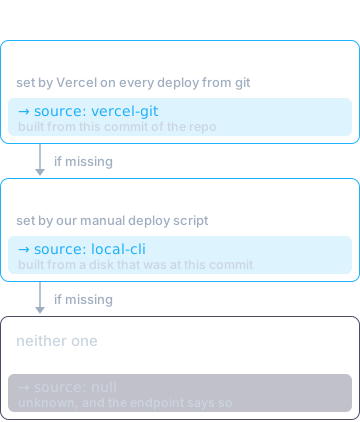
Vercel sets VERCEL_GIT_COMMIT_SHA on every deploy that comes from the
connected repository. That is the normal path and needs no configuration.
Sometimes, though, a deploy is made by hand from a machine (to redeploy
without a new commit, or after a build that failed for a transient reason),
and what gets uploaded is the working folder, not a commit. Vercel builds from
those files without .git, so inside the build there is no way to find the
hash: it has to be passed in. Our deploy script does that with
vercel --prod --build-env COMMIT_SHA=<hash>, and also sets COMMIT_BRANCH
and BUILT_AT.
Both give you a hash, but they do not mean the same thing. vercel-git means
"this was built from this commit of the repo". local-cli means "this was
built from someone's disk, which was at this commit at the time". That is why
source is in the response: with the hash alone, the two cases would look
identical.
The script refuses to deploy if the folder has uncommitted changes. Otherwise the stamped hash would describe different code from what was uploaded.
If neither variable is set, commit and source come back null. A version
endpoint that makes up a value when it does not know is worse than none.
2. Keep every cache out of it
dynamic = "force-dynamic" makes Next.js resolve the route on every request
instead of freezing it at build time, and cache-control: no-store asks the
CDN and the browser not to keep the response. Without them you risk the
endpoint answering with the commit of a previous deploy, which is exactly the
mistake it exists to prevent.
3. A check you can read with one command
The obvious path was to read the commit from the deploy metadata with
vercel inspect. The value is stored (our script puts it there too, with
--meta), but the JSON output of the CLI version we were using did not return
it. A check you cannot read with a command is not much of a check: nobody will
run it in a script or in CI.
curl plus git rev-parse can be automated. If the two hashes differ after a
merge, the deploy did not pick up your change, whether it failed, got blocked
or is still building. And you find out before a customer tells you.
Before you copy it
- The hash is public. Anyone can see which commit the site came from. Without access to the repo, that does not give them the code. If the repo is public, it gives them a direct link to the exact code that is running, which is sometimes an advantage and sometimes not. Decide on purpose.
builtAtisnullon deploys from git: only the manual deploy script sets it. If you want the build time on both paths, set it in your build too; if not, drop it from the contract.- Outside Vercel, swap the variable names for the ones your provider exposes, or have your pipeline write the commit into a variable of your own. The idea does not depend on the platform.
Thirty lines, and "which version is live?" went from investigation to a command. If any of this does not fit your stack, write to us.