In a deploy, the identity that matters is the commit author
On Vercel, the right to publish travels with the commit, not with whoever runs the command. What a seat-BLOCKED deploy looks like, why the CLI shows it as UNKNOWN, where the API keeps the reason, and the two ways out.
Also in: Español
When you think about who is allowed to publish a site, the natural answer is
the one pressing the button: the account running vercel --prod, or the
integration that reacts to the push. On Vercel there is another identity that
weighs as much or more, and it is the one nobody looks at: the commit
author.
We learned this on vendear, our storefront site with
an AI salesperson. The Vercel project lives in a Hobby-plan team with a single
member, the owner account. A collaborator who is not a member of that team
authored two commits on main, and both deployments they triggered ended in
the BLOCKED state. The code was fine, the account was active, and the owner
account was the one deploying. What had no seat was the author.
How the check works
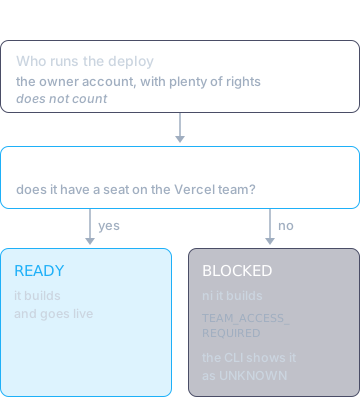
Before building, Vercel compares the commit's git identity with the team's
members. If the author is not there, the deployment never builds: it stays
BLOCKED, and the reason is stored on the deployment itself:
curl -s -H "Authorization: Bearer $VERCEL_TOKEN" \
  "https://api.vercel.com/v13/deployments/<id>?teamId=<team>" \
  | jq '{readyState, readyStateReason, seatBlock}'
In our case, seatBlock.blockCode was TEAM_ACCESS_REQUIRED.
This also explains why the site had been deploying on every push to main for
weeks without trouble: the owner account had authored every one of those
commits. The check is neither new nor flaky. It just has nothing to say until
someone from outside the team authors a commit.
What each tool shows
This is what makes the problem expensive. The real state exists, but not every tool shows it:
| Tool | What it shows |
|---|---|
vercel ls |
UNKNOWN, which reads as "old", not "failed" |
vercel inspect <url> |
status UNKNOWN, with no reason line |
GET /v13/deployments/<id> |
BLOCKED, with readyStateReason and seatBlock |
| The domain | 200, serving the previous deploy |
The site responded fine, the repo was up to date, and the CLI flagged no error. The only difference was that production was serving a commit from three days earlier, and you only see that if you ask the site which version it serves (that is what a version endpoint is for).
What does not unblock it
Three paths look reasonable and none works, because all three keep the same author:
- Waiting. A
BLOCKEDdeploy looks like a plan usage cap, something that clears on its own. It is not: a fresh deploy launched days later was blocked in the same second, with the account active and no billing issue. If what looks like a quota does not move over time, look at permissions. - Deploying by hand from disk. The owner account creates the deployment,
but the CLI attaches the local folder's git metadata, including the author of
the last commit (
githubCommitAuthorName), and the check runs on that. vercel redeploy. A blocked deployment answers400: it cannot be redeployed, and it asks for a fresh commit.
The two ways out
Give the author a seat. The right call if that person will author commits regularly. The Hobby plan does not allow adding members, so it means moving the team to Pro.
Make sure the commit that lands on the production branch is authored by someone with a seat. To unblock our case, an empty commit on
mainauthored by the owner account was enough:git commit --allow-empty -m "deploy: republish main" git push origin mainThe integration built the same tree and the deployment ended
READY. Going forward the same rule applies to merges: if the owner account closes them with squash or rebase, the commit that lands onmaincarries its authorship.
The second way out unblocks today, but it does not change the mechanism: the
next commit by someone without a seat that ends up on top of main will stop
the deploy again.
The idea worth keeping
In a pipeline we tend to think of permission as part of the session: who is logged in, which token CI uses. Here permission travels with the code. The same tree, deployed by the same account, goes live or not depending on the name written into the commit.
So when a deploy stalls with no clear error, the first question is not "who launched it?" but "who authored what sits on top of the branch?". And the second one, which catches it before a customer tells you, is "which commit is production serving?":
curl -s https://www.vendear.com/api/version