A WhatsApp preview card for a static page, without a browser on the server
Our proposals are published as static folders, and pasting one into WhatsApp showed a bare link. WhatsApp does not render SVG, and we did not want a headless browser in the container just to draw a thumbnail. A native rasterizer with its fonts packed inside now writes a 1200×630 PNG on every publish. The pipeline, the two Next.js settings it needs, and what happens when it fails.
Also in: Español
We write client proposals in an editor and publish each one as a static
folder: an index.html, its logo, and nothing that needs a server to render.
The link usually travels by WhatsApp. Until October 2, 2026, pasting it there
showed a bare URL: no image, no title worth reading. The first thing a client
saw of the proposal was a string of characters.
The card WhatsApp shows comes from the page's og:image. We already drew a
card for each proposal, but as SVG, and WhatsApp does not render SVG. It needs
a raster image (PNG or JPEG) behind an absolute URL.
The usual answer is to take a screenshot with a headless browser: Puppeteer or
Playwright running Chromium. For a 1200×630 image built from one title and one
logo, that is a whole browser installed in a node:20-alpine container,
started on every publish. We went the other way: draw the card as SVG and
rasterize it with resvg, a renderer
that ships as a precompiled native binary for each platform, linux-musl
included.
The pipeline
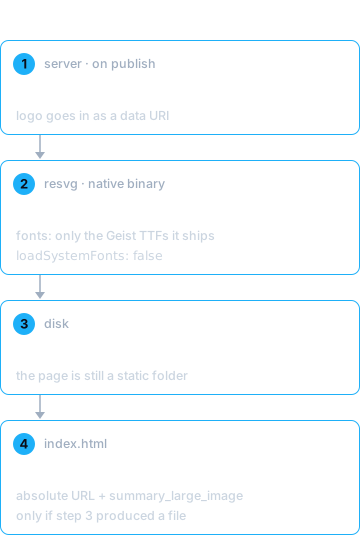
- On publish, the server builds the card as an SVG of 1200×630: the proposal's title and the brand's logo, in the brand's colors.
- resvg turns that SVG into a PNG.
- The PNG is written as
compartir.pngnext toindex.html. The proposal is still a static folder. - The HTML gets its
og:andtwitter:tags, with the image as an absolute URL. WhatsApp does not resolve relative paths.
A real proposal card came out at 33 KB.
Fonts travel with the package
This is the part that is easy to get wrong. resvg draws text with the fonts you give it. A minimal container has no fonts installed, and if you let it load system fonts, the same SVG renders differently on your laptop and on the server. So the rasterizer loads only the Geist TTFs that ship inside the package, and nothing else:
import { Resvg } from '@resvg/resvg-js';
import { fileURLToPath } from 'node:url';

const FONTS = ['Geist-Regular.ttf', 'Geist-Medium.ttf', 'Geist-SemiBold.ttf', 'Geist-Bold.ttf']
  .map((f) => fileURLToPath(new URL(`../fonts/${f}`, import.meta.url)));

export function svgToPng(svg) {
  const png = new Resvg(svg, {
    font: { fontFiles: FONTS, loadSystemFonts: false, defaultFontFamily: 'Geist' },
  }).render().asPng();
  return new Uint8Array(png);
}
Two details:
- Without fonts, resvg does not fail: it leaves the text out. The card comes back as a background with a logo and no title, and nothing throws. Our test for that renders the same card with and without a title and asserts that the two PNGs differ, and that the one with text is noticeably heavier. A test that only checked "a PNG came out" would pass with the title missing.
- Images must be data URIs. resvg does not fetch over the network or read
from disk on its own. An
<image href="logo.png">renders as a hole. The logo is read from disk and inlined as base64 before rendering.
The two Next.js settings
The publish endpoint lives in a Next.js app built with output: 'standalone'.
Both things the rasterizer depends on get lost in the bundle: resvg loads a
native .node binary, and the fonts are found with import.meta.url, which
inside a bundle points somewhere else. Two settings fix it:
// next.config.mjs
const nextConfig = {
  output: 'standalone',
  // Do not bundle these: one loads a native binary, the other finds its
  // fonts relative to its own file.
  serverExternalPackages: ['@resvg/resvg-js', '<your-rasterizer-package>'],
  // The tracer only copies what it sees imported. Fonts read by a path built
  // at runtime, and the platform binary, have to be listed.
  outputFileTracingIncludes: {
    '/api/**': [
      './node_modules/<your-rasterizer-package>/fonts/**',
      './node_modules/@resvg/resvg-js*/**',
    ],
  },
};
export default nextConfig;
We list them for every API route (/api/**) because more than one route can
publish. Without the second setting the container starts healthy and fails
the first time someone publishes, which is the worst moment to find out.
We checked it the direct way: a docker exec into the deployed container
rasterized an SVG with text and returned a PNG.
When it fails, the page goes out anyway
The card is a nice-to-have. A proposal that does not go out because its
thumbnail failed is a real problem. So the step that writes the card catches
its own error, logs it, and returns nothing; the HTML only announces
og:image if the file exists:
const card = await writeCard(dir, content); // null if the engine failed
const html = render(content, { url, ...(card ? { image: card } : {}) });
A link without a card is where we were the day before. A proposal that does not go out is a new problem, and the thumbnail is never worth that.
What we test
| test | what it proves |
|---|---|
publish writes compartir.png |
real PNG signature, 1200×630, og:image absolute, summary_large_image |
| same card with and without a title | the text is actually drawn |
| writing to a folder that does not exist | publish returns without a card instead of failing |
Before you copy it
- This is for cards you design, not screenshots of the page. If the preview has to look exactly like the rendered page, with its CSS, you do need a browser.
- resvg reads TTF and OTF, not WOFF2. The fonts you serve on your site probably will not work as they are.
- Check the deployed container, not just the build. A missing font or binary only shows up at runtime, so the check that counts is rasterizing text inside the container that is actually running.
Every proposal link we send now arrives with its own card, and the server still has no browser in it. If you send links to clients and want to see what they look like on the other side, write to us.