Is that old PR already in main? Checking after a squash merge
After a squash or rebase merge, git branch --merged, commit counts and git cherry all say a branch has pending work when it is already in. How to ask the content instead with git merge-tree, spot the branch that would roll the base back, and archive before you delete.
Also in: Español
You have eighty open PRs and half of them are months old. Many are already in: someone squash-merged them, or copied the changes into another PR, and the branch was left hanging. Closing them one by one by reading diffs does not scale. Asking git looks easy, and that is the trap: the usual three questions look at commits, and with a squash merge the branch's commits never reach the base.
What fails, in a toy repo
A feature branch with two commits, merged with git merge --squash. Its
content is fully in main. Here is what git says:
git branch --merged main        # * main        → feature is not listed
git rev-list --count main..feature   # 2         → "2 pending commits"
git cherry main feature         # + a48b573 / + 89b678e → "2 new patches"
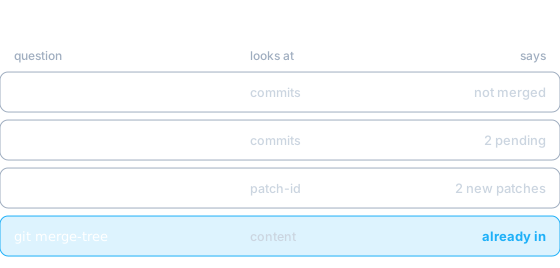
git cherry compares patch-ids, a fingerprint of each patch. A squash folds
several patches into one and the fingerprint changes, so the originals never
show up as applied. On a real sample of three squashed branches it got one
right.
The right question: would merging it change anything?
What commits the branch has does not matter; what matters is which files
you would end up with if you merged it. git merge-tree --write-tree (git
2.38+) performs the merge in memory, without touching your checkout, and
returns the resulting tree. If it equals the base tree, the branch adds
nothing:
git merge-tree --write-tree main feature   # be43f2a…
git rev-parse 'main^{tree}'                # be43f2a…  → identical: already in
It works the same for squash, rebase or a hand-made cherry-pick, because it ignores history and looks at the result.
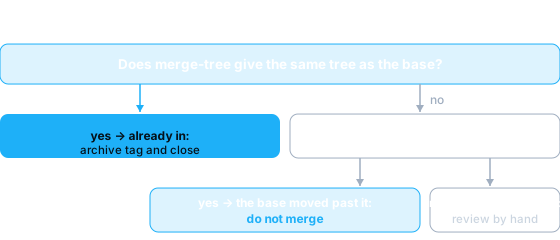
The tricky case: the base moved past it
Some branches do change the tree and still have nothing new. The branch
changed b to B, was squash-merged, and later someone on main edited it to
B2. Now merge-tree returns a different tree (or a conflict) and the diff
looks like pending work:
-B2
+B
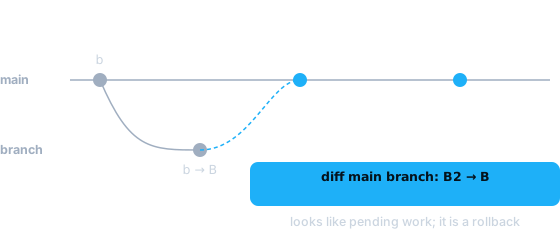
It is not work: it is an old version of something that already landed. Merging
it would roll main back. To tell them apart, ask for every file the branch
touched whether that exact version ever existed in the base after the point
where they split:
mb=$(git merge-base main branch)
for f in $(git diff --name-only "$mb" branch); do
  blob=$(git rev-parse "branch:$f")
  if git log --format=%H "$mb..main" -- "$f" | while read c; do
       [ "$(git rev-parse "$c:$f" 2>/dev/null)" = "$blob" ] && echo hit; done | grep -q hit
  then echo "already was in main: $f"
  else echo "NEW: $f"; fi
done
If every file says "already was", the branch adds nothing and does not get
merged. If any says "NEW", that one needs a human look. Comparing only against
the tip of main is not enough: you have to search the history.
Before deleting, a tag
A squashed branch has commits that exist nowhere else. Delete it and the
content is still in main but the history is gone, and if you were wrong, so
is the content. A tag costs nothing:
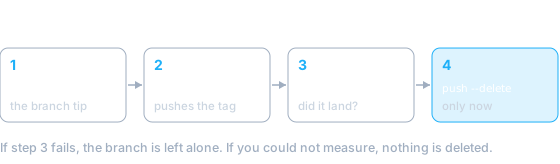
git tag "archive/2026-10-17/feature" origin/feature
git push origin "archive/2026-10-17/feature"
git ls-remote --tags origin "archive/2026-10-17/feature"   # check it landed
git push origin --delete feature                          # only now
And one rule for automating it: if you could not measure (a network error, a truncated diff), the verdict is undetermined and nothing gets deleted. "I don't know" can never fall on the irreversible side.
To start today: pick your oldest open PR, run git merge-tree --write-tree
against its base and compare the tree. If it matches, you already know what to
do with the other seventy-nine.